

رویداد
افزونه RTL Helper – اصلاح راستبهچپ سایتها در مرورگر
آذر
«اگر از چیدمان بههمریخته سایتهای فارسی و عربی خسته شدهاید، وقتش رسیده RTL Helper را امتحان کنید.»
معرفی افزونه RTL Helper
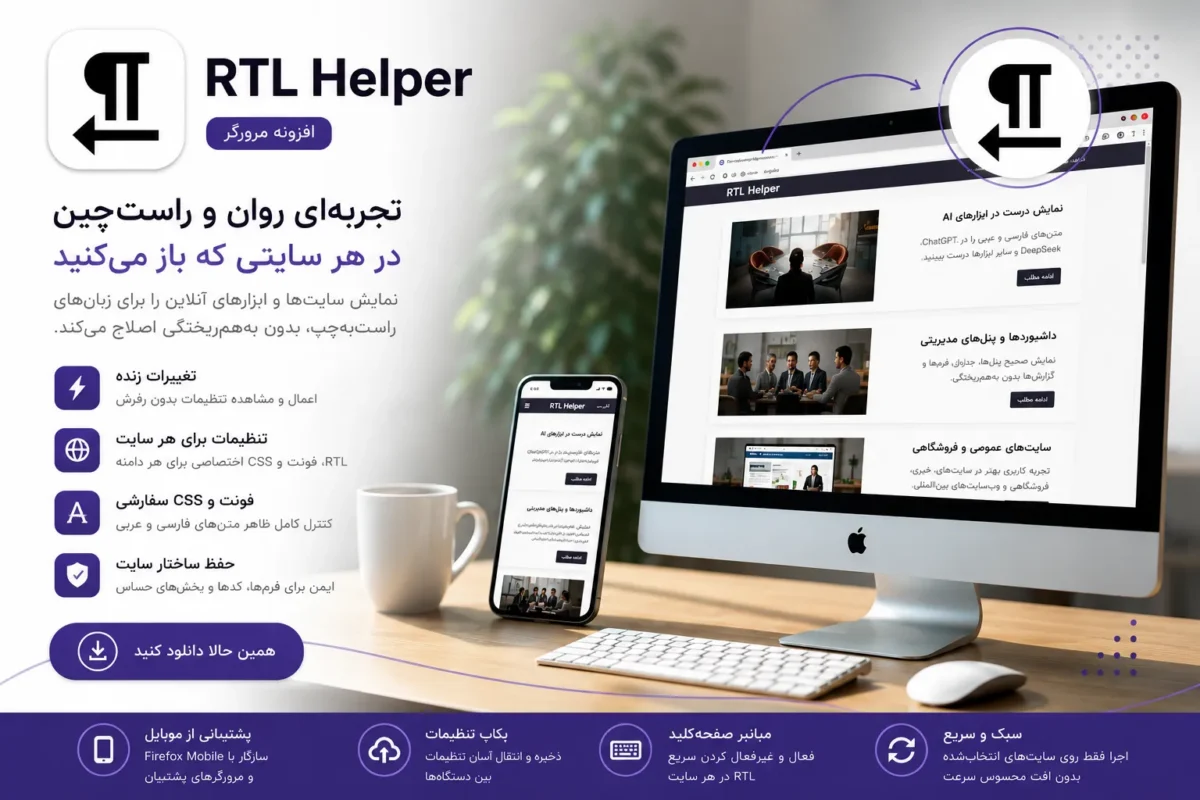
RTL Helper یک افزونه سبک و هدفمند برای مرورگر است که مشکل نمایش ناقص زبانهای راستبهچپ (فارسی، عربی، عبری، اردو و…) را در وبسایتها حل میکند؛ بدون اینکه ساختار سایت تخریب شود.
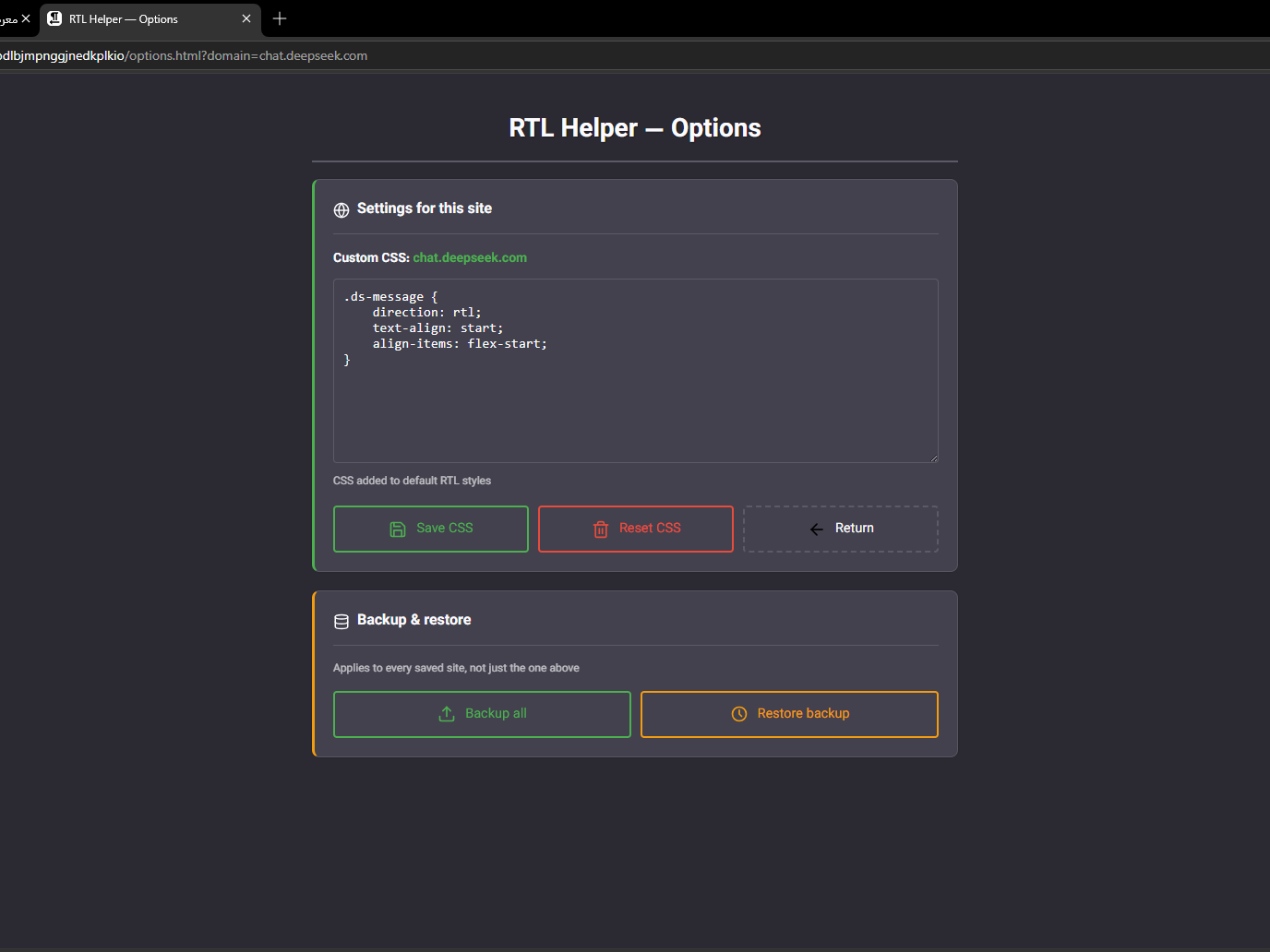
برخلاف بسیاری از ابزارهای ساده که فقط یک سوئیچ کلی هستند، این افزونه به شما کنترل دقیق روی نمایش متن میدهد: تنظیمات جداگانه برای هر سایت، انتخاب فونت، اعمال RTL روی متن یا کل صفحه، و حتی CSS سفارشی.
نتیجه: متنی خوانا، بدون بههمریختگی و بدون نیاز به اصلاح دستی در هر بار بازدید.
هماکنون برای Firefox، Edge و Chrome منتشر شده و نسخه Opera بهزودی ارائه میشود.
چرا هنوز راستچین یک مسئله حلنشده است؟
با وجود اینکه کاربران زبانهای راستبهچپ جمعیت بسیار بزرگی را تشکیل میدهند، در عمل:
- بسیاری از وبسایتها RTL را ناقص یا سطحی پیادهسازی میکنند.
- جزئیات مهم مثل فونت مناسب، تراز متن، فرمها و جدولها نادیده گرفته میشود.
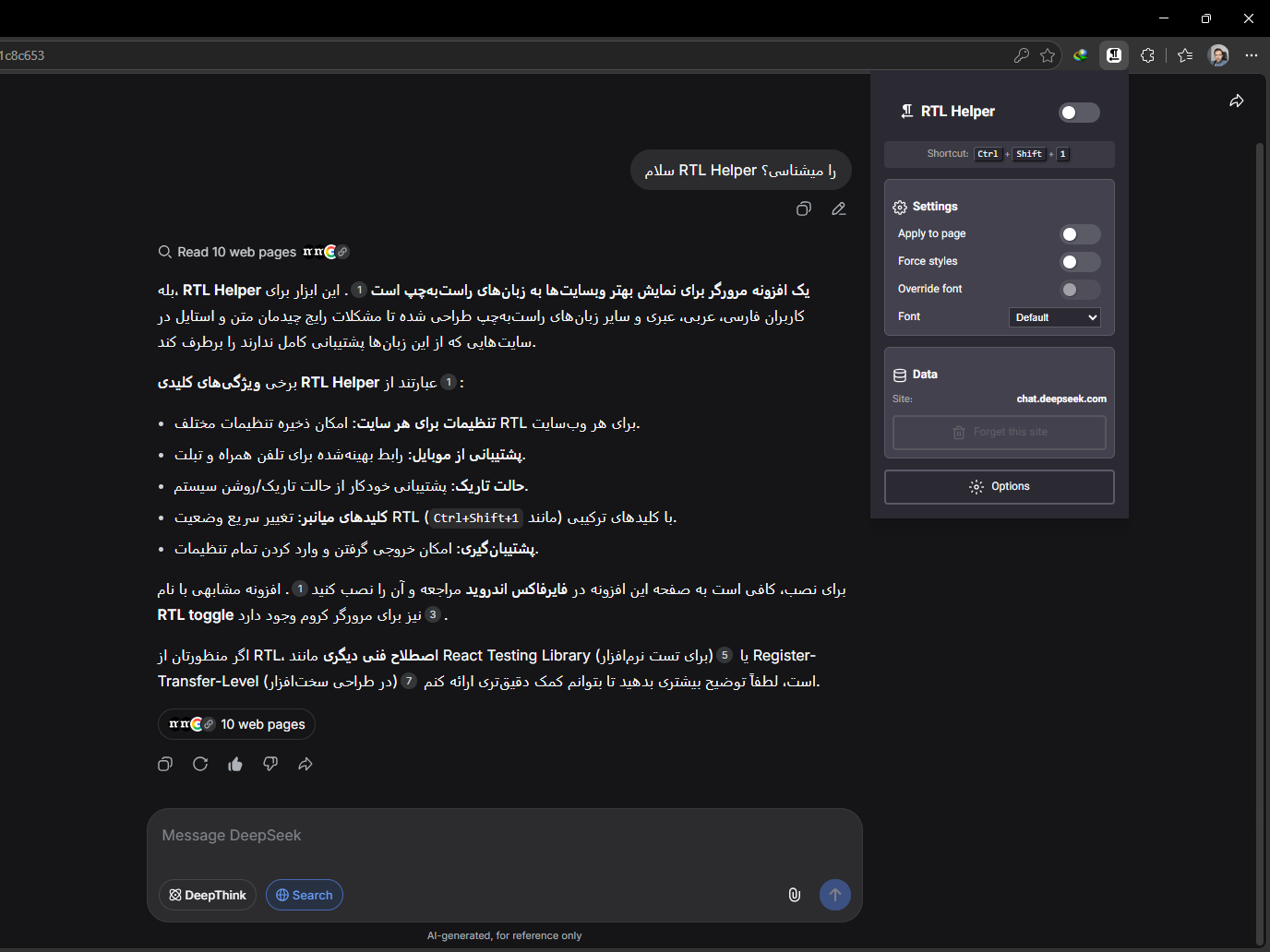
- ابزارهای مدرن – از جمله بسیاری از سرویسهای مبتنی بر هوش مصنوعی – نمایش راستچین را بهدرستی پشتیبانی نمیکنند.
نتیجه برای کاربر:
- خوانایی پایین و خستگی بصری.
- نیاز به اصلاح دستی در هر بار بازدید.
- عدم تجربه کاربری حرفهای.
RTL Helper دقیقاً برای چنین شرایطی ساخته شده است؛ نه یک سوئیچ ساده، بلکه یک ابزار کنترل کامل.
ویژگیهای کلیدی افزونه RTL Helper
رابط کاربری زنده (Live UI)
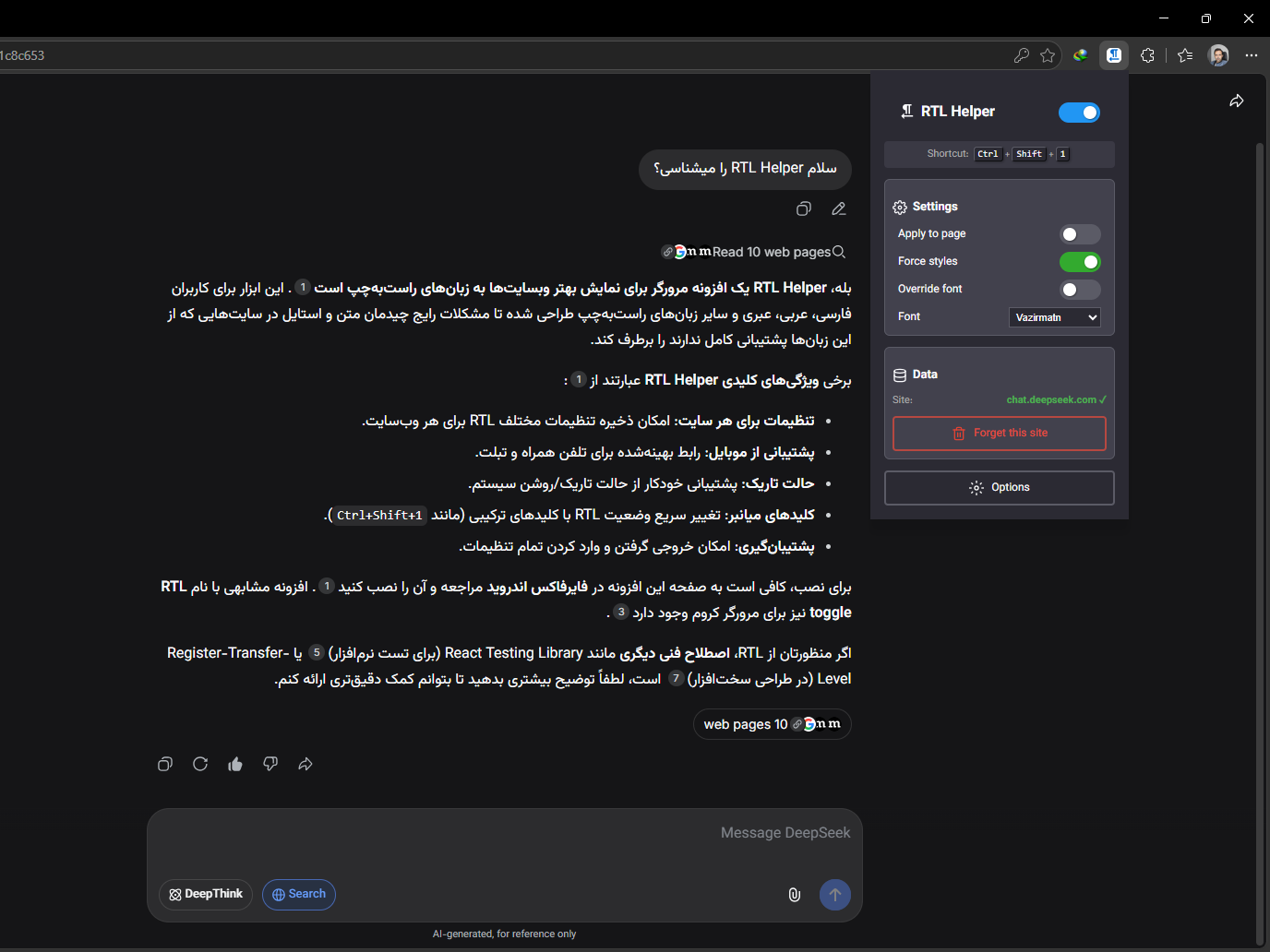
هر تغییری در تنظیمات بدون نیاز به رفرش صفحه، بلافاصله اعمال میشود و نتیجه را همان لحظه میبینید.
RTL اختصاصی برای هر سایت
تنظیمات دامنهمحور ذخیره میشود. یعنی:
- RTL فقط برای سایتهایی فعال میشود که واقعاً نیاز دارید.
- هر دامنه تنظیمات مستقل خود را دارد (فونت، CSS سفارشی، حالت اجباری و…).
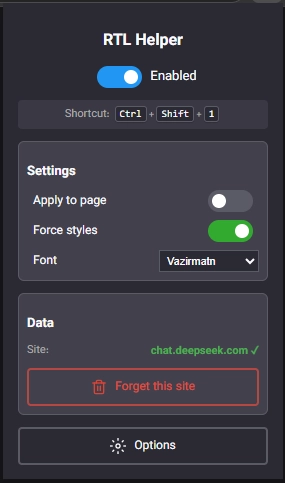
- تنظیمات قابل ذخیره برای هر سایت: فعال/غیرفعال RTL | انتخاب فونت | اعمال روی متن یا کل صفحه | حالت اجبار | CSS سفارشی.
حفظ ساختار سایت و استثناها
برخلاف بسیاری از ابزارهای ساده، RTL Helper کورکورانه راستچین نمیکند:
- بلوکهای
codeوpreهمچنان چپبهراست میمانند. - فرمها و جداول رفتار قابلپیشبینی دارند.
- راستچین کنترلشده اعمال میشود، نه سراسری.
این ویژگی افزونه را برای سایتهای فنی، داشبوردها و ابزارهای تخصصی قابل استفاده میکند.
مدیریت فونت و تایپوگرافی
امکان انتخاب فونتهای مناسب RTL از میان بیش از ۸ فونت محلی و CDN (گوگل فونت). کاربر مشخص میکند فونت فقط روی متنها اعمال شود یا کل بدنه سایت.
CSS سفارشی برای کنترل حرفهای
کاربران پیشرفته میتوانند برای هر دامنه به طور جداگانه CSS اختصاصی تعریف کنند؛ بدون تغییر کد اصلی سایت.
پشتیبانی واقعی از موبایل (نقطه قوت مهم)
برخلاف بسیاری از افزونهها، نسخه Firefox موبایل کاملاً سازگار است:
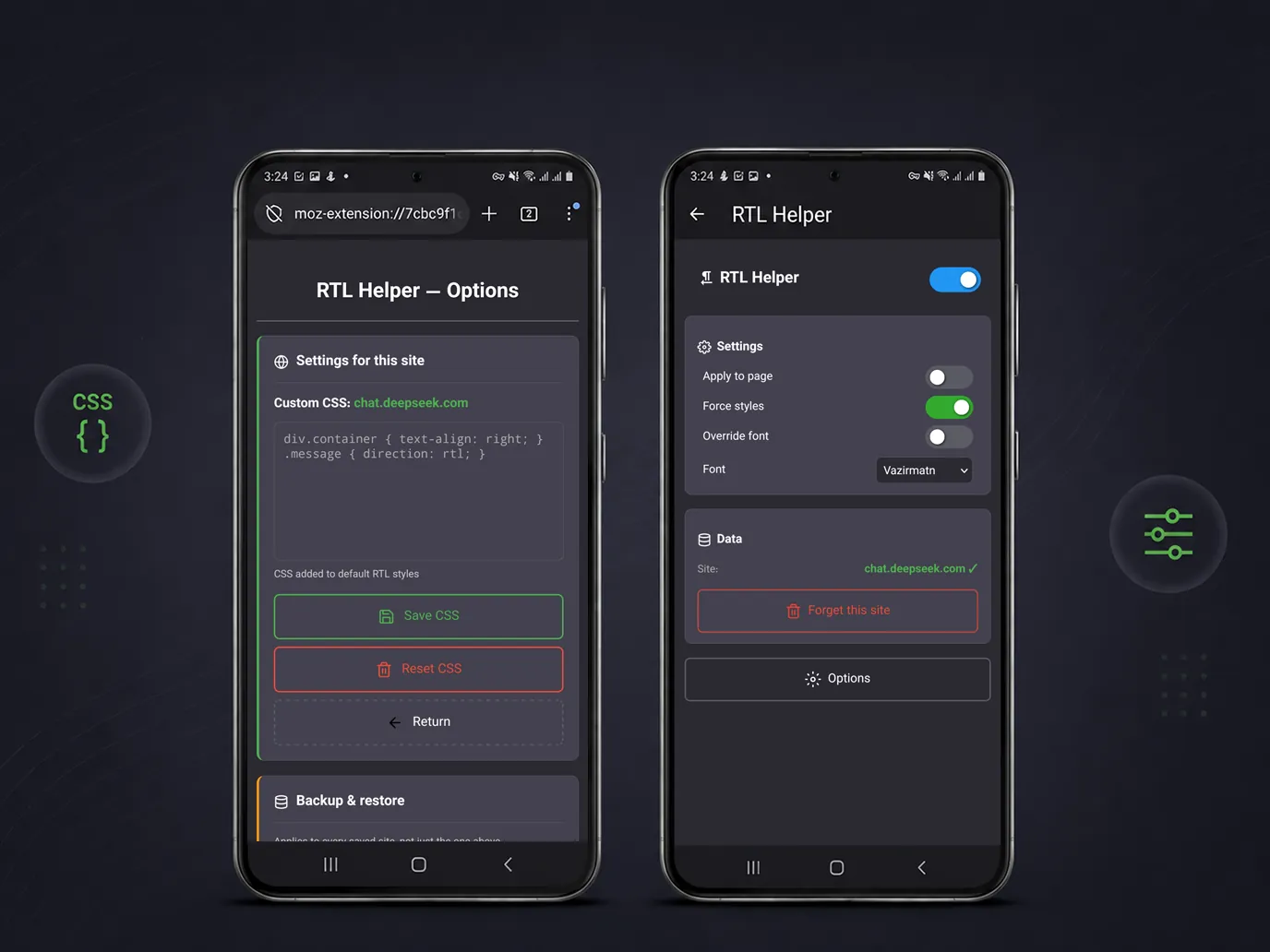
- رابط کاربری لمسی بهینهشده.
- المانهای غیرضروری در موبایل بهصورت هوشمند مخفی میشوند.
- یکی از معدود راهحلهای واقعی RTL روی موبایل.
نکته فنی: Chrome موبایل فعلاً از افزونه پشتیبانی نمیکنند؛ اما Firefox و Edge این امکان را دارند.
کلید میانبر و کنترل سریع
Ctrl + Shift + 1 (ویندوز) / Cmd + Shift + 1 (مک) – فعال/غیرفعال سریع RTL در هر لحظه.
پشتیبانگیری و بازیابی تنظیمات
- خروجی گرفتن از تنظیمات همه دامنهها (فایل JSON).
- بازیابی امن با تأیید کاربر.
- مناسب برای انتقال به مرورگر دیگر یا نگهداری نسخه پشتیبان.
مقایسه با افزونههای مشابه
- فقط یک سوئیچ ساده نیست – کنترل کامل دارید.
- تنظیمات دامنهمحور(هر سایت جدا).
- رابط کاربری زنده – بدون رفرش.
- CSS سفارشی برای هر دامنه.
- پشتیبانی واقعی از موبایل (Edge, Firefox).
- حالت اجباری (
!important) برای غلبه بر استایلهای سرسخت سایتها.
بسیاری از افزونههای مشابه یا بیش از حد سادهاند یا برای استفاده روزمره کاربردی نیستند. RTL Helper برای استفاده حرفهای روزانه طراحی شده است.
| ویژگی | افزونههای رایج RTL | RTL Helper |
|---|---|---|
| تنظیمات مستقل برای هر دامنه | ❌ معمولاً ندارد | ✅ دارد (per‑site) |
| CSS اختصاصی برای هر سایت | ❌ محدود یا سراسری | ✅ دامنهمحور + فیلد جداگانه |
| رابط کاربری زنده (Live Preview) | ❌ نیاز به رفرش دارد | ✅ بدون رفرش – لحظهای |
| پشتیبانی از موبایل (Firefox, Edge) | ❌ معمولاً طراحی نشده | ✅ سازگار با لمس + مخفی شدن خودکار المانها |
حالت اجباری (!important) |
◼️ معمولاً ندارد | ✅ دارد – غلبه بر استایلهای سرسخت |
| پشتیبانگیری و بازیابی | ❌ ندارد | ✅ خروجی JSON + تأیید کاربر |
حفظ ساختار (code, pre) |
❌ اغلب خراب میشود | ✅ استثناهای هوشمند (code/pre دست نخورده) |
| سرعت و پایداری | ◼️ متوسط | ✅ سبک + دابانس هوشمند در پسزمینه |
کاربردهای رایج
RTL Helper در سناریوهای مختلفی کاربرد دارد، از جمله:
- اصلاح نمایش فارسی در ابزارهای مبتنی بر هوش مصنوعی (ChatGPT، Gemini DeepSeek، Cloude، Copilot و مشابه).
- خواناتر کردن سایتها و پنلهای خارجی (مدیریت، گزارشگیری، داشبوردها).
- محیطهای کاری و توسعه – مستندات فنی، گیتهاب، ویکیها.
- مطالعه منابع آموزشی – وبلاگها، مقالهها، آموزشهای آنلاین.
- و هر جایی که راستچین بهدرستی پیادهسازی نشده است.
سیاست حفظ حریم خصوصی
- هیچ داده شخصی جمعآوری نمیشود.
- هیچ سابقه مرور یا محتوای وبسایتی ذخیره یا ارسال نمیشود.
- تمام تنظیمات (فونت، CSS سفارشی، وضعیت دکمهها) فقط روی دستگاه شما و به صورت محلی ذخیره میشوند (
chrome.storage.local). - هیچ دادهای با شخص ثالث به اشتراک گذاشته نمیشود.
- فونتهای خارجی (گوگل فونت) فقط در صورت انتخاب شما بارگذاری میشوند.
کد منبع افزونه کاملاً متنباز است، هرکسی میتواند این ادعاها را شخصاً بررسی کند: مشاهده گیتهاب پروژه
جمعبندی
RTL Helper پاسخی عملی به مشکلی قدیمی است که هنوز در وب حل نشده است.
این افزونه نهتنها برای دسکتاپ، بلکه برای موبایل (از طریق Firefox و Edge) نیز راهحلی واقعی ارائه میدهد؛ چیزی که بسیاری از ابزارها از آن غافل ماندهاند.
اگر با زبانهای راستبهچپ کار میکنید و از نمایش ناقص وبسایتها خسته شدهاید، RTL Helper ابزاری است که دقیقاً برای همین نیاز ساخته شده است.
توسعهیافته توسط پیوندنگار – کد منبع
سوالات متداول
خیر. افزونه RTL Helper فقط نمایش سمت کاربر را تغییر میدهد. هیچ تغییری در کد، محتوا یا تنظیمات اصلی سایت ایجاد نمیشود و با غیر فعال کردن افزونه، همه چیز به حالت اولیه بازمیگردد.
از نظر فنی بله؛ افزونه برای محیطهای لمسی و موبایل سازگار طراحی شده است.
اما امکان نصب و استفاده از افزونهها روی موبایل به پشتیبانی مرورگر بستگی دارد. هر مرورگری که API افزونهها را در موبایل فعال کند، افزونه RTL Helper بدون تغییر قابل استفاده خواهد بود.
افزونه RTL Helper برای فایرفاکس و ادج و کروم منتشر شده و برای اپرا نیز بهزودی منتشر میشود.
بله. یکی از قابلیتهای اصلی افزونه، ذخیره تنظیمات بهصورت دامنهمحور است. راستچین فقط روی سایتهایی که خودتان مشخص میکنید فعال میشود.
بله، برای هر دامنه تنظیمات جداگانه دارد و هنگام مراجعه دوباره آنها را خودکار اعمال میکند.
بله، یکی از مزایای مهم افزونه همین قابلیت است.
در اغلب موارد خیر. بهصورت کنترلشده RTL را اعمال میکند و امکان استثنا کردن بخشها یا استفاده از CSS اختصاصی را میدهد.
با این حال، برخی سایتها با ساختارهای بسیار خاص ممکن است نیاز به تنظیم دستی داشته باشند.
خیر. RTL Helper یک افزونه سبک است و فقط روی سایتهایی که برای آنها فعال شده اجرا میشود. هیچ پردازش دائمی یا سراسری روی همه صفحات انجام نمیدهد.
بله. افزونه امکان پشتیبانگیری و بازیابی تنظیمات را فراهم میکند. این قابلیت برای انتقال تنظیمات بین مرورگرها یا نگهداری نسخه پشتیبان کاربردی است.
بسیاری از ابزارهای آنلاین، پنلهای هوش مصنوعی و وباپلیکیشنها توجه کافی به زبانهای راستبهچپ ندارند.
RTL Helper کمک میکند متن فارسی یا عربی در این محیطها خواناتر و قابل استفادهتر شود.
خیر. یک راهحل سمت کاربر است، نه جایگزین طراحی صحیح. این افزونه زمانی کاربرد دارد که:
-
سایت راستبهچپ را رعایت نکرده
-
یا امکان تغییر کد سایت وجود ندارد
خیر. تمام تنظیمات بهصورت محلی در مرورگر ذخیره میشوند و هیچ دادهای به سرور خارجی ارسال نمیشود.
بله. کد کامل RTL Helper بهصورت متنباز روی گیتهاب منتشر شده است. هرکسی میتواند آن را بررسی، دانلود، یا در توسعه آن مشارکت کند: github.com/asadister/rtl-helper
دریافت افزونه
 فایرفاکس (AMO)
 ادج (Microsoft Edge Add-ons)
 کروم (Chrome Web Store) – اپرا، بریو و غیره
نسخه موبایل
برای استفاده از RTL Helper روی گوشی:
- فایرفاکس موبایل – دریافت از گوگلپلی
- ادج موبایل – دریافت از گوگلپلی
نکته فنی: کروم و اپرا در نسخه موبایل فعلاً از افزونهها پشتیبانی نمیکنند. RTL Helper روی هر مرورگری که از افزونه پشتیبانی کند (مانند فایرفاکس، ادج، کیوی، یاندکس) بدون محدودیت اجرا میشود.
«If you’re tired of the messy layouts of Persian and Arabic websites, it’s time to try RTL Helper.»
Introducing RTL Helper
RTL Helper is a lightweight and purpose-built browser extension that fixes incomplete rendering of right-to-left languages (Persian, Arabic, Hebrew, Urdu, and more) on websites—without breaking the site’s structure.
Unlike many simple tools that are just a global switch, this extension gives you precise control over text rendering: separate settings for each website, font selection, applying RTL to text or the entire page, and even custom CSS.
The result: readable text, no layout issues, and no need for manual fixes every time you visit a website.
Now available for Firefox, Microsoft Edge, and Google Chrome, with an Opera version coming soon.
Why Is RTL Still an Unsolved Issue?
Although right-to-left language users make up a large portion of the global user base, in practice:
- Many websites implement RTL either partially or superficially.
- Important details such as proper fonts, text alignment, forms, and tables are often ignored.
- Modern tools—including many AI-based services—do not fully support correct RTL rendering.
Impact on users:
- Poor readability and visual fatigue.
- The need for manual adjustments on every visit.
- Lack of a consistent, professional user experience.
RTL Helper is designed specifically for these situations—not as a simple switch, but as a complete control tool.
Key Features of RTL Helper
Live User Interface (Live UI)
All settings changes are applied instantly without refreshing the page, allowing you to see results in real time.
Per-Site RTL Configuration
Settings are stored on a per-domain basis, meaning:
- RTL is enabled only for the websites where it is actually needed.
- Each domain has its own independent configuration (fonts, custom CSS, force mode, etc.).
- Per-site settings include: RTL enable/disable, font selection, applying RTL to text or full page, force mode, and custom CSS.
Website Structure Preservation and Exceptions
Unlike many simple tools, RTL Helper does not blindly apply RTL formatting:
codeandpreblocks remain left-to-right.- Forms and tables behave predictably.
- RTL is applied in a controlled and selective way, not globally.
This makes the extension suitable for technical websites, dashboards, and specialized tools.
Font and Typography Management
You can choose from more than 8 local and CDN-based fonts (including Google Fonts). Fonts can be applied either to text content only or to the entire page.
Custom CSS for Advanced Control
Advanced users can define custom CSS per domain without modifying the original website code.
Real Mobile Support (Key Advantage)
Unlike many extensions, Firefox Mobile is fully supported:
- Touch-optimized interface.
- Non-essential UI elements are automatically hidden on mobile.
- One of the few practical RTL solutions available on mobile browsers.
Technical note: Chrome for Android does not support browser extensions, while Firefox and Edge do.
Keyboard Shortcut and Quick Control
Ctrl + Shift + 1 (Windows) / Cmd + Shift + 1 (macOS) — quickly toggle RTL on or off at any time.
Backup and Restore Settings
- Export all domain settings as a JSON file.
- Secure restore with user confirmation.
- Useful for migration or backup purposes.
Comparison with Similar Extensions
- Not just a simple toggle — full control is provided.
- Per-domain configuration (each site separately).
- Live UI with no page refresh required.
- Custom CSS per domain.
- Real mobile support (Firefox and Edge).
- Force mode (
!important) to override stubborn website styles.
Many similar extensions are either too simplistic or not practical for daily use. RTL Helper is designed for professional everyday usage.
| Feature | Common RTL Extensions | RTL Helper |
|---|---|---|
| Independent settings per domain | ❌ Usually not | ✅ Yes (per‑site) |
| Custom CSS per site | ❌ Limited or global | ✅ Domain‑specific + separate field |
| Live UI (Live Preview) | ❌ Requires refresh | ✅ No refresh – instant |
| Mobile support (Firefox, Edge) | ❌ Usually not designed | ✅ Touch‑optimised + auto‑hide elements |
Force important (!important) mode |
◼️ Usually not | ✅ Yes – overrides stubborn styles |
| Backup & restore | ❌ No | ✅ JSON export + user confirmation |
Preserving structure (code, pre) |
❌ Often breaks | ✅ Smart exceptions (code/pre untouched) |
| Speed & stability | ◼️ Average | ✅ Lightweight + intelligent debouncing in background |
Common Use Cases
RTL Helper is useful in a variety of scenarios, including:
- Fixing Persian text rendering in AI-based tools (ChatGPT, Gemini, DeepSeek, Claude, Copilot, and similar platforms).
- Improving readability of external websites and dashboards (administration panels, reporting tools, analytics dashboards).
- Work and development environments – technical documentation, GitHub, wikis.
- Learning and educational resources – blogs, articles, and online tutorials.
- And any other case where right-to-left rendering is not properly implemented.
Privacy Policy
- No personal data is collected.
- No browsing history or website content is stored or transmitted.
- All settings (fonts, custom CSS, toggle states) are stored locally on your device only (
chrome.storage.local). - No data is shared with third parties.
- External fonts (Google Fonts) are loaded only when explicitly enabled by the user.
The extension’s source code is fully open-source; anyone can independently verify these claims: View the project’s GitHub
Summary
RTL Helper is a practical solution to a long-standing issue that still exists across the web.
The extension provides a real solution not only for desktop, but also for mobile devices (via Firefox and Edge), addressing a gap that many tools overlook.
If you work with right-to-left languages and are frustrated by inconsistent web rendering, RTL Helper is designed specifically for this need.
Developed by Peyvandnegar – Source code
Frequently Asked Questions
No. The RTL Helper extension only changes the user-side display. It does not modify the site’s code, content, or core settings, and everything returns to its original state when the extension is disabled.
Technically, yes; the extension is designed to be compatible with touch and mobile environments.
However, the ability to install and use extensions on mobile depends on browser support. Any browser that enables extension APIs on mobile can use RTL Helper without any modifications.
RTL Helper is available for Firefox, Chrom and Edge versions for Opera will be released soon.
Yes. One of the main features of the extension is domain-based settings. RTL is enabled only on the websites you specify.
Yes, each domain has separate settings, which are automatically applied when you visit again.
Yes, one of the key advantages of the extension is this feature.
No. All settings are stored locally in the browser, and no data is sent to any external server.
In most cases, no. It applies RTL in a controlled manner and allows excluding specific sections or using custom CSS.
However, some websites with very specific structures may require manual adjustments.
No. RTL Helper is a lightweight extension and runs only on the websites where it is enabled. It does not perform any continuous or global processing on all pages.
Yes. The extension provides the ability to backup and restore settings. This feature is useful for transferring settings between browsers or keeping a backup copy.
Many online tools, AI dashboards, and web applications do not provide adequate support for right-to-left languages.
RTL Helper helps make Persian or Arabic text more readable and usable in these environments.
No. It is a user-side solution, not a replacement for proper design. This extension is useful when:
-
The website does not follow RTL conventions
-
Or there is no possibility to modify the site’s code
Yes. The complete source code of RTL Helper is publicly available on GitHub. Anyone can review it, download it, or contribute to its development: github.com/asadister/rtl-helper
Get the Extension
Mobile Version
To use RTL Helper on your phone:
- Firefox Mobile – Get it on Google Play
- Edge Mobile – Get it on Google Play
Technical Note: Chrome and Opera on mobile do not currently support extensions. RTL Helper will run without any limitations on any browser that supports extensions (such as Firefox, Edge, Kiwi, Yandex).
